
Streamline Your Video Collection: The Top 5 Best ISO to MP4 Converters and How to Use Them
Looking to convert your DVD ISO files to MP4? Check out our guide featuring the top 5 best ISO to MP4 converters. Streamline your video collection and watch your favorite videos on any device with ease!

Introduction
DVDs used to be the most popular format for storing and sharing videos, but now they are slowly being replaced by digital formats. DVD ISO files are digital images of DVD discs that contain all the data and structure of the original DVD. Converting DVD ISO files to MP4 format allows you to watch your favorite videos on various devices, such as smartphones, tablets, and computers. In this article, we will discuss the top 5 best ISO to MP4 converters, their pros and cons, and how to convert DVD ISO to MP4.
Top 5 Best ISO to MP4 Converters
HandBrake
HandBrake is a free and open-source video converter that supports various video formats, including converting DVD ISO files to MP4 format. It has a simple interface and offers many features, such as batch conversion, video filtering, and custom presets. HandBrake is available for Windows, Mac, and Linux.
Pros: Free, open-source, easy to use, supports many features.
Cons: May be slow for large files, limited output formats.
VLC Media Player
VLC Media Player is a free and open-source player that can also be used for basic ISO to MP4 conversion. In addition to playing DVDs, ISO files, and many digital video formats, VLC allows users to convert video content into formats such as MP4. It is available for Windows, Mac, and Linux, making it a convenient option for users who want an all-in-one media tool without installing extra software.
Pros: Free, open-source, widely available, supports many media formats.
Cons: ISO to MP4 conversion features are basic, interface is less intuitive for ripping tasks, may not work well with complex ISO files
DVDFab DVD Ripper
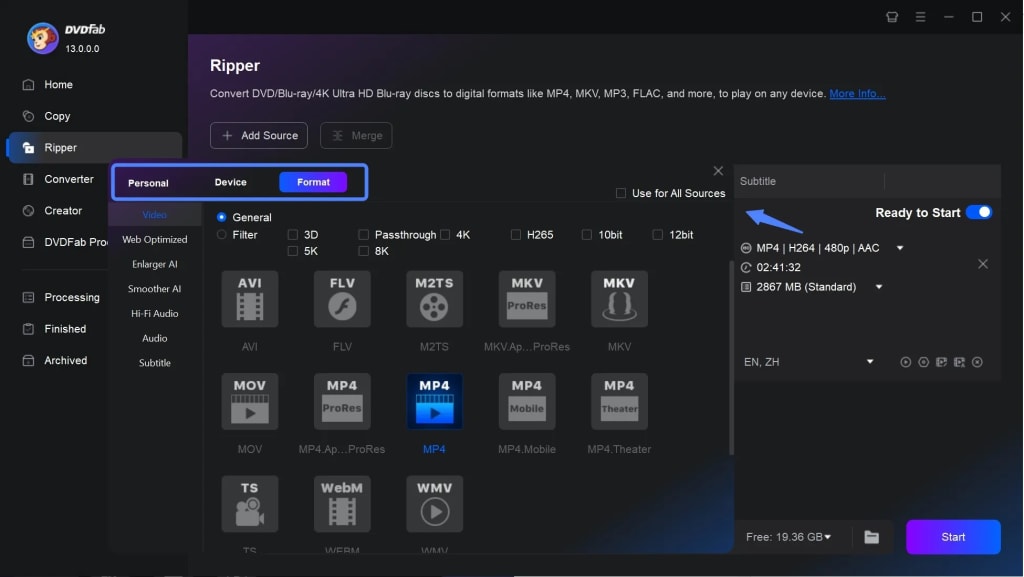
DVDFab DVD Ripper is a professional ISO to MP4 converter that supports various input and output formats, including DVD discs, ISO files and VIDEO_TS folders. It has a user-friendly interface and offers many features, such as video editing, DVD ripping, and batch conversion. DVDFab DVD Ripper is available for Windows and Mac.
Pros: Professional features, fast conversion speed, supports many output formats.
Cons: Not free, limited trial version.
FFmpeg
FFmpeg is a powerful free and open-source multimedia framework that can convert, record, and process a wide variety of video and audio files, including DVD ISO sources in certain workflows. It is especially popular among advanced users because this ISO to MP4 converter offers precise control over encoding settings, output quality, and file compression. FFmpeg works through command-line instructions and is available for Windows, Mac, and Linux.
Pros: Free, open-source, highly flexible, supports advanced customization.
Cons: Not beginner-friendly, command-line based, requires more technical knowledge than GUI tools.
Online ISO to MP4 Converter
Online ISO to MP4 Converter is a web-based tool that allows users to convert ISO files to MP4 without downloading desktop software. This kind of tool can be useful for people who only need a quick conversion and prefer a simple browser-based solution. In most cases, users just upload the ISO file, choose MP4 as the output format, and start the conversion process.
Pros: No installation required, easy to use, accessible from any device with a browser.
Cons: Upload speed may be slow for large ISO files, file size limits may apply, privacy and security may be a concern for some users.
How to Convert DVD ISO Files to MP4
- Download and install a DVD ISO to MP4 converter, such as HandBrake.
- Open the converter and select the DVD ISO file you want to convert.
- Select the output format as MP4 and choose the video and audio settings.
- Start the conversion process and wait for it to finish.
- Once the conversion is complete, you can find the MP4 file in the output folder.
Conclusion
Converting DVD ISO files to MP4 format allows you to watch your favorite videos on various devices. There are many ISO to MP4 converters available, each with its own pros and cons. HandBrake, DVDFab DVD Ripper, VLC, FFmpeg and Online ISO to MP4 converter are some of the best ISO to MP4 converters available. When converting DVD ISO files to MP4, it's important to choose the right converter and select the appropriate video formats. So, choose as your need and preference.
About the Creator
Wenny
Hi there, I'm Wenny, a technical writer sharing multimedia solutions accessible for everyone. Read my articles to turn "how?" into "let's do it!"
From $5.9B to $19B: Why Data Is Powering the Rise of Payer Analytics in Healthcare
Healthcare systems worldwide generate enormous volumes of data every day—from insurance claims and billing records to patient demographics and treatment histories. As healthcare spending increases and reimbursement models shift toward value-based care, insurers and health plans must analyze this data effectively to remain sustainable. This is where payer analytics in healthcare is becoming a crucial technology foundation.
By Steve Waugh2 days ago in 01
Silken Chains
Silhouettes of the female form were given flesh and bone. Silken skin glistened under the spotlight. Dry ice rose around our Icons as they danced atop their podiums in the Square. Heralded for their beauty, their movements were slight, powerful, and sensual.
By Paul Stewart7 days ago in Fiction




Comments
There are no comments for this story
Be the first to respond and start the conversation.