
How to Choose Between Rehosting, Replatforming, and Refactoring for Legacy Cloud Migration
A Practical Guide to Choosing the Right Cloud Migration Strategy for the Legacy Applications

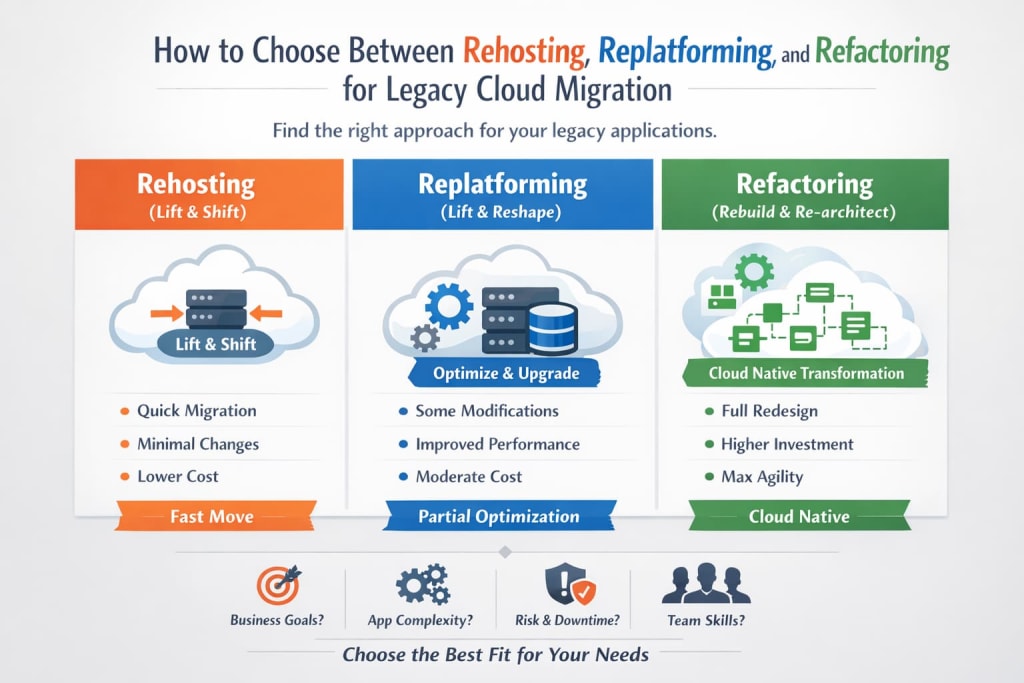
Legacy systems are the backbone of many enterprises, powering critical business operations for years or even decades. However, as cloud computing becomes the de facto standard for scalability, cost-efficiency, and innovation, organizations face a crucial question: how do you migrate legacy applications to the cloud in a way that maximizes value and minimizes risk?
There isn’t a one-size-fits-all answer. The best migration strategy depends on business goals, application architecture, budget, and organizational readiness. Three of the most common approaches are Rehosting, Replatforming, and Refactoring. Understanding their differences and when to use each is key to a successful cloud transformation.
Understanding the Three Cloud Migration Strategies
Rehosting (Lift-and-Shift)
Rehosting, commonly called “lift-and-shift,” is the fastest way to move an existing application to the cloud. In this approach, the application is moved “as-is” to cloud infrastructure with minimal or no changes to its code, architecture, or functionality.
Pros of Rehosting:
- Speed: Migration can happen quickly, often within weeks.
- Low Complexity: Minimal changes mean fewer technical risks.
- Minimal Business Disruption: Users and operations remain largely unaffected.
Cons of Rehosting:
- Limited Cloud Benefits: Applications don’t automatically gain scalability, elasticity, or advanced cloud services.
- Potential Inefficiency: You may replicate on-premise inefficiencies in the cloud.
- Ongoing Maintenance: Technical debt remains unless addressed post-migration.
Example: Moving a Java EE application from an on-premise server to an AWS EC2 instance without altering its code or database.
Replatforming (Lift-and-Reshape)
Replatforming goes one step further. Instead of simply moving the application, certain changes are made to optimize it for cloud performance and efficiency. These changes are typically minor adjustments, rather than a complete rewrite.
Pros of Replatforming:
- Cloud Benefits: Applications gain some advantages of cloud infrastructure, such as managed databases or auto-scaling.
- Moderate Complexity: More optimized than rehosting but less risky than refactoring.
- Cost Efficiency: Reduced operational overhead through partial optimization.
Cons of Replatforming:
- Time Investment: Requires some code or architecture changes.
- Not Fully Cloud-Native: The application may still carry legacy constraints.
- Requires Cloud Expertise: Teams need knowledge of cloud-native services and integration.
Example: Migrating an on-premise SQL Server database to Amazon RDS and updating application connections, without rewriting the application logic.
Refactoring (Re-architecting)
Refactoring, also called re-architecting, involves redesigning applications to fully exploit cloud-native capabilities. It’s the most time-consuming and resource-intensive approach but offers the greatest long-term benefits.
Pros of Refactoring:
- Maximizes Cloud Advantages: Leverages microservices, serverless computing, managed services, and auto-scaling.
- Improves Agility: Easier to enhance and maintain in the future.
- Long-Term Cost Savings: Cloud-native apps can reduce infrastructure and operational costs over time.
Cons of Refactoring:
- High Initial Effort: Requires a full rewrite or major architectural changes.
- Longer Timelines: Can take months or even years for complex systems.
- Resource Intensive: Demands skilled developers and strong project management.
Example: Breaking a monolithic .NET Framework application into microservices deployed on Kubernetes, leveraging serverless functions for batch processing, and integrating with cloud-native storage solutions.
Key Factors to Consider When Choosing a Strategy
Choosing the right approach depends on business priorities, application characteristics, and organizational readiness. Here are the critical factors to weigh:
a. Business Goals
- Speed vs. Optimization: If time-to-market is urgent, rehosting may be the best option. For long-term cost savings and scalability, refactoring is often preferred.
- Budget Considerations: Rehosting is generally the least expensive upfront; refactoring requires higher initial investment but may reduce long-term operational costs.
- Innovation Needs: Applications that are core to strategic initiatives may benefit from full refactoring to enable future innovation.
b. Application Complexity
- Monolithic vs. Modular: Monolithic applications are harder to refactor but easier to rehost. Modular applications or microservices are easier to replatform or refactor.
- Dependencies: Applications with complex integrations may need a phased approach to avoid disrupting business operations.
- Legacy Technologies: Older technologies like COBOL or on-prem middleware may require specialized migration tools or expertise.
c. Risk and Downtime
- Business-Critical Apps: Systems that must run continuously may favor rehosting or careful replatforming.
- Testing Capacity: Refactoring requires rigorous testing to avoid functional regressions.
- Rollback Plans: Always have a rollback strategy for any migration approach.
d. Team Skills and Resources
- Cloud Expertise: Refactoring requires deep knowledge of cloud-native architecture, DevOps, and modern programming frameworks.
- Training Needs: Replatforming may require moderate upskilling, while rehosting often needs minimal training.
- Availability of Developers: Legacy skills may be scarce, especially for older platforms like COBOL or Java EE.
When to Choose Each Strategy
1. Rehosting (Lift-and-Shift)
Rehosting is ideal when your priority is speed and minimal disruption. If your organization needs to move legacy applications to the cloud quickly—perhaps to decommission aging on-prem servers, reduce immediate operational costs, or meet urgent business deadlines—rehosting allows you to migrate with minimal changes. This approach is especially useful for non-critical applications or utilities that do not require advanced cloud-native features. While it doesn’t fully leverage cloud capabilities, it provides a fast, low-risk path to the cloud.
2. Replatforming (Lift-and-Reshape)
Replatforming makes sense when you want partial optimization without a full rewrite. Choose this strategy for applications that would benefit from cloud-managed services, auto-scaling, or improved performance but don’t yet justify a complete re-architecture. Replatforming is suitable for applications with moderate complexity or those critical to business operations where downtime or migration risk needs to be carefully controlled. It balances improved efficiency with manageable effort, providing a middle ground between simple lift-and-shift and full refactoring.
3. Refactoring (Re-architecting)
Refactoring is the right choice for strategically important applications that will drive future growth and innovation. When an application must be highly scalable, resilient, and fully optimized for cloud-native features, refactoring allows for a complete redesign, often involving microservices, serverless functions, or cloud-native storage solutions. This approach requires more time, resources, and skilled developers, but it delivers maximum long-term agility, performance, and cost efficiency. Refactoring is ideal for applications central to your digital transformation strategy or where future flexibility and innovation are top priorities.
Practical Steps to Decide
Here’s a practical decision-making framework to help you choose:
- Inventory Your Applications: List all applications, their dependencies, criticality, and technology stack.
- Define Business Objectives: Identify priorities—speed, cost, scalability, innovation, compliance.
- Assess Technical Readiness: Evaluate code quality, modularity, and cloud compatibility.
- Estimate Effort and ROI: Consider migration costs, cloud savings, and expected performance improvements.
- Choose a Pilot Application: Test your chosen migration strategy on a low-risk system before rolling it out enterprise-wide.
- Plan Phased Migration: For large portfolios, mix strategies: some apps may be rehosted, others refactored over time.
Common Pitfalls to Avoid
- Choosing Speed Over Strategy: Quick rehosting may save time now but create technical debt later.
- Ignoring Cloud-Native Benefits: Failing to leverage managed services, auto-scaling, or serverless computing reduces ROI.
- Underestimating Complexity: Even rehosting can involve hidden dependencies or integrations that complicate the move.
- Neglecting Testing and Monitoring: Cloud migration without rigorous validation can disrupt business operations.
Case Example: Mixed Approach in Practice
A global logistics company had a portfolio of 200+ legacy applications:
- Critical ERP and Financial Apps: Refactored into microservices with cloud-native database services.
- Customer-Facing Web Apps: Replatformed to leverage managed services and improve scalability.
- Internal Tools and Utilities: Rehosted to the cloud with minimal disruption.
The result? A phased, cost-effective migration that balanced speed, risk, and cloud benefits. The company reduced infrastructure costs by 30% and accelerated development cycles for new features.
Conclusion
Migrating legacy applications to the cloud is not just a technical exercise—it’s a strategic decision. Choosing between Rehosting, Replatforming, and Refactoring requires careful consideration of business goals, application complexity, team skills, and risk tolerance.
- Rehosting is fast and simple, ideal for urgent migration
- Replatforming balances minor optimization with moderate effort
- Refactoring unlocks full cloud potential, though it requires time and resources
The right approach is often a mix, tailored to each application and aligned with business priorities. By making an informed choice, organizations can maximize cloud benefits, reduce risk, and future-proof their IT landscape.
About the Creator
Chudovo
Chudovo is a custom software development company, focused on complex systems implementation.
Mobile EdTech Apps Market Toward USD 83.8 Bn By 2034
the Mobile EdTech Apps market is witnessing rapid expansion driven by the increasing use of smartphones and digital learning platforms. The market is projected to reach approximately USD 83.8 Billion by 2034, growing from USD 7.5 Billion in 2024, at a CAGR of 27.30% during the forecast period. This strong growth reflects rising demand for flexible, on-demand learning solutions among students and professionals. In 2024, North America dominated the market with a share of 45.7%, generating around USD 3.4 Billion, while the U.S. alone accounted for USD 2.74 Billion, highlighting its central role in digital education adoption.
By Roberto Crum7 days ago in Education
From Global Insights to Local Impact: What U.S. Health Leaders Can Learn from International Systems
In an increasingly interconnected world, healthcare challenges are no longer confined to national borders. Pandemics, workforce shortages, rising costs, and disparities in access to care are global issues that require innovative and adaptive leadership. For U.S. health system executives, looking beyond domestic models offers valuable lessons that can strengthen performance, improve patient outcomes, and enhance system resilience.
By Craig Kent6 days ago in Education


Comments
There are no comments for this story
Be the first to respond and start the conversation.